HoneyBook Alternatives (2026): 10 Compared, With Prices
Ten HoneyBook alternatives for one person or a small team, with prices checked on October 30, 2026, what 1, 3 and 6 people pay, and how to move your clients out.
By Opusite Team · Updated

The best HoneyBook alternative depends on how many people will use it. For one person, Moxie Starter is $10 a month billed yearly and Plutio Core is $190 a year, and both list invoices, contracts and client scheduling. For a coach, Paperbell adds a coaching website for $97 a month. For a small team, Dubsado Premier is $525 a year and includes 3 additional users. For comparison, HoneyBook Starter is $29 a month billed yearly, and its first plan with a scheduler is $49.
This guide compares ten alternatives. Every price was read from the vendor's own pricing page on October 30, 2026. We also work out what 1, 3 and 6 people pay on each, because HoneyBook's team limits change the answer.
We make Opusite, one of the ten. It is built for teams, it is sold from 3 seats, and it costs far more than HoneyBook. If you work alone, it is not for you, and we say so in its section. The sources for every price are listed at the end.
The short answer
- You work alone and want the lowest price: Moxie, Plutio or Indy.
- You want deep automated workflows: Dubsado.
- You also track time and projects for clients: Bonsai or Plutio.
- You are a photographer: Bloom, which adds gallery delivery.
- You are a coach: Paperbell, which adds a coaching website.
- You want one plan with every feature: 17hats.
- You want something free: Indy's free plan or Bitrix24 Free, each with limits.
- You are a team of 3 or more that also runs projects, support and team chat: Opusite, from $450 a month for 3 seats.
What HoneyBook does, job by job
Before you compare tools, list the HoneyBook jobs you actually use. Here is each one in HoneyBook's own words, and the plan where it starts. Both come from HoneyBook's pricing page and help center on October 30, 2026.
| HoneyBook job | HoneyBook's description | First HoneyBook plan with it |
|---|---|---|
| Lead forms | "Capture and book leads, sell digital products, and more" | Starter (2 live forms); Essentials (10); Premium (unlimited) |
| Proposals | "Let clients book, sign, and pay from a single file" | Starter |
| Contracts | "Collect eSignatures on contracts and forms" | Starter |
| Invoices and payments | "Send professional invoices with flexible payment options" | Starter |
| Client portal | "Provide a dedicated page to access files and project details" | Starter |
| Calendar | "Sync your existing work calendar with HoneyBook" | Starter |
| Scheduler | "Set and share your availability so clients can book your time" | Essentials |
| Automations | "Automate repetitive tasks and workflows" | Essentials |
| QuickBooks Online integration | Listed on the plan card | Essentials |
| Team members | "Add team members to help run your business" | Essentials (up to 2); Premium (unlimited) |
If you only use proposals, contracts and invoices, nearly every tool below covers you. If you rely on the scheduler and automations, compare plans at that level, not the cheapest one.
Why people look for HoneyBook alternatives
We read the pages that rank for "honeybook alternatives" on October 30, 2026, and HoneyBook's own pricing and help pages. Four reasons come up.
1. The plan you need costs more than the starting price. HoneyBook's headline is "Plans start as low as $29/mo." That Starter price is billed yearly; monthly it is $36. The scheduler and automations start on Essentials, at $49 billed yearly or $59 monthly.
2. Team members are capped by plan. HoneyBook's help center says Starter "cannot add any team members." Essentials can add up to two. A third helper means Premium, at $109 a month billed yearly or $129 monthly.
3. Payment fees add up. HoneyBook's pricing page says card fees "start at 2.7% + 10¢" and bank transfers cost 1.5%. On a $3,000 invoice paid by card, that is at least $81.10. Other tools charge payment fees too; Bloom, for example, says Stripe's processing fees still apply. Compare fees, not only plan prices.
4. Price changes. Two Reddit threads rank for this search. In one, the poster is switching from HoneyBook "with their upcoming price increase." In the other, the poster writes, "Just heard fees doubled on HoneyBook." Separately, HoneyBook's help center says a first-year promotion renews "at the regular rate after the first year." We could not check HoneyBook's past prices, so this guide only quotes today's.
Prices, checked on October 30, 2026
Prices are in US dollars. "Yearly" is the monthly price when you pay for a year up front, as each vendor shows it.
| Tool and plan | Billed yearly | Billed monthly | How it is charged | Free plan or trial |
|---|---|---|---|---|
| HoneyBook Starter / Essentials / Premium | $29 / $49 / $109 a month | $36 / $59 / $129 | Per account; up to 2 team members on Essentials, unlimited on Premium | 30-day free trial, no credit card |
| Moxie Starter / Pro / Teams | $10 / $20 / $32 a month ($120 / $240 / $385 a year) | $12 / $25 / $40 | Per account; Teams has up to five team members | "Try for free" |
| Plutio Core / Pro | $190 / $490 a year | $19 / $49 | Core is for one person and 9 active clients; Pro includes 30 contributors | 7-day free trial |
| Indy Free / Pro | Pro $18.75 a month ($225 a year), or $12.50 a month billed $300 every 2 years | Pro $25 | Per account | Free plan; 7-day Pro trial |
| Bonsai Basic / Essentials / Premium / Elite | $9 / $19 / $29 / $49 a user a month | $15 / $25 / $39 / $59 a user | Per user; Elite needs 3 users | 7-day free trial |
| Dubsado Starter / Premier | $335 / $525 a year | $35 / $55 | Per account; 3 additional users free, then $25 a month for 4 to 10 users | 21-day free trial of Premier |
| Bloom Starter / Standard / Plus | $14 / $34 / $66 a month ($168 / $408 / $792 a year) | $18 / $44 / $78 | Per account; Starter adds a 1.5% Bloom fee on digital payments | 7-day free trial; a 50% off sale was showing |
| 17hats | $600 a year, or $800 for two years | $60 | One plan with every feature; extra users sold separately | 7-day free trial |
| Paperbell | $970 a year | $97 | One plan for coaches | 30-day money-back guarantee |
| Bitrix24 Free / Basic / Standard / Professional | Basic $49, Standard $99, Professional $199 a month billed annually | Basic $69, Standard $144, Professional $289 | Per organisation: Basic covers 5 users, Standard 50, Professional 100 | Free for 1 to 2 users |
| Opusite Business or Operations / both | Not offered | $150 / $225 a seat | In steps of 3, 6 or 9 seats; 10 or more priced with you | No; a 30-minute demo first |
Two sales were running on the day we checked. Bloom showed 50% off its plans, and Plutio showed a banner for 15% off any plan. The table uses the regular prices each page listed.
What 1, 3 and 6 people pay each month
A per-plan price only means something at your team size. Here is the cheapest plan on each tool that lists invoices, contracts and client scheduling, billed yearly where that is offered.
| Tool | 1 person | 3 people | 6 people | Plan and notes |
|---|---|---|---|---|
| Moxie | $10 | $32 | Not listed | Starter, then Teams; Teams covers up to five team members |
| Plutio | $15.83 | $40.83 | $40.83 | Core, then Pro, which includes 30 contributors |
| Bonsai | $19 | $57 | $114 | Essentials, $19 a user |
| Dubsado | $43.75 | $43.75 | $68.75 | Premier; 3 additional users free, then $25 a month |
| HoneyBook | $49 | $49 | $109 | Essentials (you plus 2), then Premium |
| Bloom | $34 | $66 | $66 | Standard, then Plus, the plan Bloom marks for small teams; no team limit on its page |
| 17hats | $50 | Not listed | Not listed | One plan; extra users cost more, but the price is not on its pricing page |
| Paperbell | $80.83 | Not listed | Not listed | One plan for coaches |
| Bitrix24 | $199 | $199 | $199 | Professional, the first plan that lists Booking, for up to 100 users; Standard ($99) has invoices and e-signature but no booking |
| Opusite | Not sold | $675 | $1,350 | Business + Operations, because client booking is in Operations; Business alone is $450 and $900 |
Indy is left out because its pricing page lists no booking page for clients.
For one person, five tools in this table cost less than HoneyBook Essentials. For three people, HoneyBook Essentials at $49 sits in the middle. At six people, Plutio, Bloom and Dubsado each cost less than HoneyBook Premium, though Bloom's page does not say how many people Plus covers. Opusite is the most expensive line at 3 and 6 people and is not sold to one person; why anyone would pay it is in its section.

The ten alternatives
Grouped by who they suit. The first group is for one person, the second for coaches and photographers, the third for teams.
1. Moxie: the cheapest full client flow for one person
Moxie is built for freelancers. Its Starter plan lists client and project management, invoicing and payments, proposals, quotes and contracts, time tracking, a sales pipeline, forms and meeting schedulers.
Price. Starter is $10 a month billed yearly ($12 monthly). Pro is $20 ($25) and adds a white-labeled client portal and workflow automations. Teams is $32 ($40) for up to five team members.
Where it falls short. The Teams plan stops at five team members, and its pricing page does not say whether that number counts you.
Pick it if you work alone, mostly need proposals, contracts and invoices, and price is the main reason you are leaving.
2. Plutio: the most room for a small team
Plutio puts projects, invoices, proposals, contracts, scheduling, forms and time tracking on every plan. The plans differ in limits.
Price. Core is $19 a month or $190 a year, for solo work with up to 9 active clients. Pro is $49 a month or $490 a year, with unlimited active clients and 30 contributors included.
Where it falls short. Core's 9-active-client limit is low for a busy solo business. White-label is a $9 a month add-on on Core and Pro.
Pick it if you are growing from one person to a few, and want one price for up to 30 contributors.
3. Indy: the free starting point
Indy is aimed at freelancers who want simple paperwork.
Price. The Free plan lets you create 3 proposals, contracts and invoices a month, with up to 3 clients. Pro is $25 a month, $18.75 a month billed $225 a year, or $12.50 a month billed $300 every 2 years. Pro has a 7-day free trial.
Where it falls short. Its pricing page lists no booking page for clients and no team plan. Indy says Pro charges are non-refundable once your paid subscription starts.
Pick it if you send a handful of proposals and invoices a month and want to pay nothing until you need more.
4. Bonsai: if you track time and projects too
Bonsai combines client paperwork with time tracking and project management, priced per user.
Price. Essentials is $19 a user a month billed yearly ($25 monthly). It is the first plan with invoices and payments, proposals and contracts, forms, scheduling and a client portal. Basic is $9 but lacks those. Premium is $29 and adds a deals pipeline and reports. Elite is $49 and needs at least 3 users.
Where it falls short. Per-user pricing grows with every hire. Six people on Essentials cost $114 a month, against $109 for HoneyBook Premium.
Pick it if you bill by the hour or manage projects, and want contracts and time sheets in one tool.
5. Dubsado: deep workflows, generous on users
Dubsado is known for detailed, automated client workflows. Its pricing page lists invoices, payments, scheduling, legally binding contracts, proposals, forms, lead capture and client portals.
Price. Starter is $35 a month or $335 a year. Premier is $55 a month or $525 a year, and adds scheduling, automated workflows, public proposals and Zapier. Every account gets 3 additional users free; 4 to 10 users add $25 a month.
Where it falls short. Scheduling and workflows are on Premier only, so most people leaving HoneyBook will want the $55 plan. A Reddit reply in a thread that ranks for this search calls its setup "time-consuming," so plan for setup time.
Pick it if you want automated client steps and a team of up to 4 at no extra user cost.
6. 17hats: one plan, everything in it
17hats sells one plan with every feature. Its features page lists quotes, contracts, invoices, payment schedules, online scheduling, lead capture forms, workflows and a client portal.
Price. $60 a month, $600 a year, or $800 for two years. Bank connect is an extra $5 a month. There is a 7-day free trial.
Where it falls short. Additional users are sold separately, and the price is not shown on its pricing page. At $50 a month on a yearly plan, it costs more than HoneyBook Essentials for one person.
Pick it if you want every feature in one plan and do not want to compare tiers.
7. Bloom: for photographers
Bloom is built around photography businesses. Its plans include invoices, card and ACH payments through Stripe, e-signature contracts, lead forms and a CRM pipeline.
Price. Starter is $18 a month or $168 a year. Standard is $44 a month or $408 a year, and Plus is $78 a month or $792 a year. Bloom describes Standard and Plus as adding scheduling, automations, websites and image delivery; its gallery delivery includes favorites, downloads and a store. On October 30, Bloom's pricing page showed a 50% off sale.
Where it falls short. Starter has a 1.5% Bloom fee on digital payments, on top of Stripe's fees. Its pricing page lists no team-member limit for Plus.
Pick it if you deliver photo galleries and want them in the same tool as your contracts and invoices.
8. Paperbell: for coaches
Paperbell is one plan for coaches. It includes a coaching website, client scheduling, payments and packages, a client portal, contract signing and group coaching tools.
Price. $97 a month or $970 a year. Paperbell says it adds no transaction fees of its own, and offers a 30-day money-back guarantee.
Where it falls short. At $97 a month ($80.83 billed yearly) it costs about 1.6 times HoneyBook Essentials ($59 monthly, $49 yearly). Its tools are shaped around coaching sessions and packages, not project work.
Pick it if you sell coaching sessions and want your website, booking and payments in one place.
9. Bitrix24: a free plan, then one flat price
Bitrix24 is a broad workspace: CRM, tasks, chat and more, priced per organisation instead of per user.
Price. Free for 1 to 2 users, with a basic CRM, tasks, shared calendars, chat and video calls. Basic is $49 a month billed annually for 5 users. Standard is $99 a month billed annually for 50 users, and is the first plan with invoices and estimates, a web form designer and e-signature. Professional is $199 a month billed annually for 100 users, and is the first plan that lists Booking. Its page also shows newer Vibe+ plans at higher prices.
Where it falls short. It is much bigger than HoneyBook, so setup takes longer. Invoices and e-signature start on Standard, and client booking starts on Professional, at $199 a month billed annually.
Pick it if you want one flat price for a growing team and do not mind learning a larger tool.
10. Opusite: for teams that run more than the client flow
We make this one.
Opusite is not a cheaper HoneyBook. It is for teams, typically 5 to 20 people, that use HoneyBook for clients but also run projects, a help desk and team chat in other apps. It is sold in steps of 3, 6 or 9 seats, so the smallest team plan is 3 seats, or $450 a month. It has no plan for one person that includes clients and invoices.
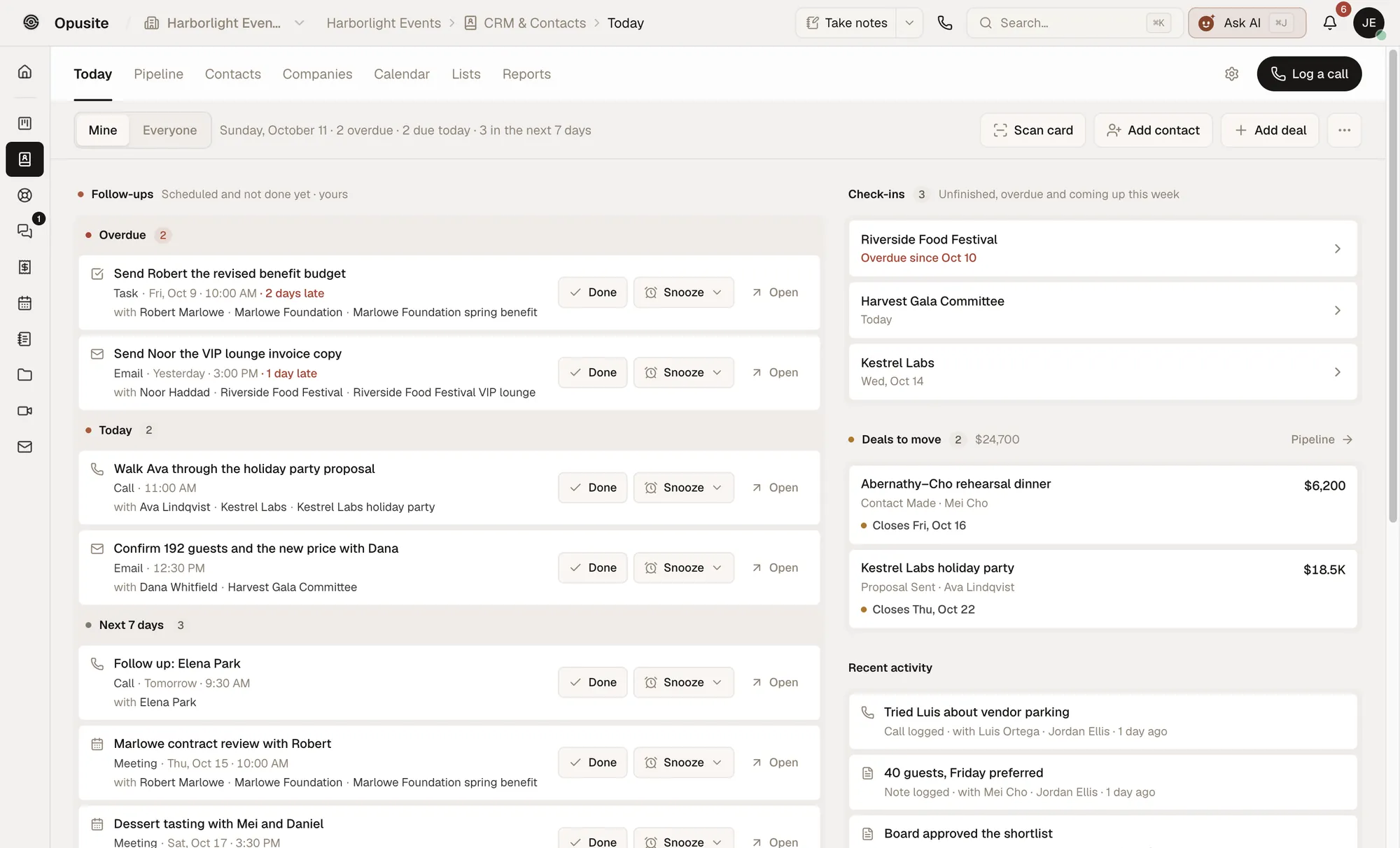
What replaces what. If you are moving from HoneyBook, this is the map. It is based on what our pricing and features pages list today.
| HoneyBook job | In Opusite | Opusite plan |
|---|---|---|
| Lead forms | Forms: 10 field types and show-and-hide rules; answers can go to the CRM | Business |
| Pipeline and client records | CRM: contacts, companies and deals, with a Today screen of follow-ups due | Business |
| Proposals | No proposal tool on our plan list. If proposals win you work, keep a tool that has them | None |
| Contracts and e-signature | Signatures: send PDFs for e-signature with a signing order, an emailed code and an audit trail | Business |
| Invoices | Invoices with tax rates, PDF and email delivery, and a link clients open without logging in; recurring invoices too. Ask on the demo call about taking card payments | Business |
| Scheduler | Appointments: booking links with your hours, buffers and intake questions; guests book, reschedule or cancel themselves | Operations |
| Client portal | A Help Desk portal where customers track their tickets. It is not a project portal for files and payments | Business |
| Tasks | Workbench: project boards with board, list and table views | Business or Operations |
| Approvals on creative work | Proofing: mark up images and PDFs and collect approve or request-changes decisions from outside reviewers | Business |
Price. $150 a seat a month for Business or Operations, or $225 a seat for both, in steps of 3, 6 or 9 seats. Ten seats or more are priced with you. Every company gets $25 of AI use a month. Setup is a 30-minute call, then your team is invited and your tools are switched on.
Where it falls short. It costs far more than every other tool here: 3 seats of Business and Operations are $675 a month, against $49 for HoneyBook Essentials. It has no proposal tool, and our pricing page lists no free plan or free trial. It is not full bookkeeping, so keep QuickBooks or Xero. It is invite-only, so the way in is a demo call.
Pick it if your team of 3 or more already pays for HoneyBook plus a project tool, a help desk or team chat, and you would rather pay more for one workspace set up with you. Skip it if you work alone or only need the client flow. See what each Opusite plan includes and costs.
How to move off HoneyBook without losing anything

- Export your contacts. In HoneyBook, go to Clients, then Contacts. Select the triple-dot icon and choose Download spreadsheet. The CSV holds each contact's name, email, phone number, address, notes and the date they were added.
- Save signed contracts and invoices as PDFs. HoneyBook saves smart files one at a time. Open the project, open the file, select the triple-dot icon and choose Print file. Then set the printer to Save as PDF.
- Download your reports. On desktop, HoneyBook's Reports tab has a Downloadable reports card. Pick a date range and download reports one by one or in bulk. Keep a full year for your accountant.
- Finish open payment schedules first. List every project with a payment still due. Either collect it in HoneyBook or reissue it from the new tool before you switch.
- Rebuild your forms and automations last. List the three automations you rely on most, and rebuild those first in the new tool.
- Cancel from Company Settings. HoneyBook's pricing page says you can cancel at any time from your company settings. Keep both tools for two weeks, then cancel.
Opusite's CRM imports a CSV or Excel file of up to 25,000 rows, so HoneyBook's contact spreadsheet comes in as contacts and companies. Open projects and contracts are set up by hand. Setup itself is a 30-minute call with us. The CRM with project management guide shows how a won deal and its work sit together afterwards.
How to choose, in five questions
- How many people will log in? HoneyBook Starter allows no team members and Essentials allows two. Moxie Teams covers up to five, Dubsado includes 3 additional users and Plutio Pro includes 30. Opusite starts at 3 seats.
- Do clients book times with you? If yes, compare plans with a scheduler: HoneyBook Essentials, Dubsado Premier, Moxie Starter, Plutio Core or Bonsai Essentials.
- How do clients pay you? Compare payment fees, not only plan prices. HoneyBook's card fees start at 2.7% plus 10 cents, and Bloom Starter adds 1.5%.
- Is your work a type of business with its own tool? Photographers should look at Bloom and coaches at Paperbell.
- Does your team need more than the client flow? If you also pay for a project tool, a help desk or team chat, compare Bitrix24 and Opusite against what you pay for all of them together.
How we checked these prices
Each price was read from the vendor's own pricing page on October 30, 2026, in a browser in the United States. We switched each page between yearly and monthly billing where it had a switch, and we quote both. Where a page showed a sale, we quote the regular price and say a sale was showing. HoneyBook's team limits come from its help center, and its payment fees from its pricing page. A yearly price divided by 12 is rounded to the cent. Feature lists come from each vendor's own pricing or features page; we did not sign up for each tool. Vendors change prices without notice, so check the source before you buy, and tell us at sales@opusite.com if a figure here is out of date.
Sources
Read on October 30, 2026, from the United States.
- HoneyBook pricing: https://www.honeybook.com/pricing
- HoneyBook Help Center, "Common questions about team member and bookkeeper access in HoneyBook": https://help.honeybook.com/en/articles/9777952-common-questions-about-team-member-and-bookkeeper-access-in-honeybook
- HoneyBook Help Center, "Understand HoneyBook membership price changes and taxes": https://help.honeybook.com/en/articles/5698594-understand-honeybook-membership-price-changes-and-taxes
- HoneyBook Help Center, "Download and export your contacts list from HoneyBook": https://help.honeybook.com/en/articles/2650752-download-and-export-your-contacts-list-from-honeybook
- HoneyBook Help Center, "Print or save a smart file as a PDF": https://help.honeybook.com/en/articles/5949670-print-or-save-a-smart-file-as-a-pdf
- HoneyBook Help Center, "A Guide to HoneyBook Reports & Analytics": https://help.honeybook.com/en/articles/2209117-a-guide-to-honeybook-reports-analytics
- Moxie pricing: https://www.withmoxie.com/pricing
- Plutio pricing: https://www.plutio.com/pricing
- Indy pricing: https://weareindy.com/pricing
- Bonsai pricing: https://www.hellobonsai.com/pricing
- Dubsado pricing: https://www.dubsado.com/pricing
- 17hats pricing: https://www.17hats.com/pricing
- 17hats features: https://www.17hats.com/features
- Bloom pricing: https://bloom.io/pricing
- Paperbell pricing: https://paperbell.com/pricing
- Bitrix24 pricing: https://www.bitrix24.com/prices/
- Reddit r/smallbusiness, "Honeybook Alternatives?": https://www.reddit.com/r/smallbusiness/comments/1hba549/honeybook_alternatives/
- Reddit r/smallbusiness, "HoneyBook vs. Bloom vs. Cone — any others???": https://www.reddit.com/r/smallbusiness/comments/1jolbhb/honeybook_vs_bloom_vs_cone_any_others/
- Opusite pricing: /pricing
- Opusite features: /features
Questions people ask
- What is the best alternative to HoneyBook?
- It depends on how many people use it. For one person, Moxie Starter is $10 a month billed yearly and Plutio Core is $190 a year; both list invoices, contracts and client scheduling. For a coach, Paperbell ($97 a month) adds a coaching website. For a team that also runs projects, support and chat, Opusite puts those in one workspace from $150 a seat, sold in steps of 3, 6 or 9 seats.
- Is there a free alternative to HoneyBook?
- Yes, with limits. Indy's free plan lets you create 3 proposals, 3 contracts and 3 invoices a month, for up to 3 clients. Bitrix24 has a free plan for 1 to 2 users with a basic CRM, tasks and calendars, but its invoices and e-signature start on the Standard plan, $99 a month billed annually. HoneyBook itself has a 30-day free trial with no credit card, not a free plan.
- Is Dubsado cheaper than HoneyBook?
- Usually, yes. Dubsado Premier, which includes scheduling and automated workflows, is $525 a year, or about $43.75 a month. HoneyBook Essentials, its first plan with a scheduler and automations, is $49 a month billed yearly. Dubsado also includes 3 additional users free, while HoneyBook Essentials allows up to 2 team members.
- What is the best HoneyBook alternative for photographers?
- Bloom is built around photographers' work. Its Standard and Plus plans include contracts, scheduling and image gallery delivery with favorites, downloads and a store. Standard is $34 a month billed yearly or $44 monthly. On October 30, 2026, Bloom was also showing a 50% off sale on its pricing page.
- Does HoneyBook charge fees on payments?
- Yes. HoneyBook's pricing page says card processing fees start at 2.7% plus 10 cents, and bank transfers (ACH) cost 1.5%. It says there are no international or premium card brand fees, and that Premium members who take in over $500,000 a year may get lower card fees.
- How many team members can HoneyBook have?
- It depends on the plan. HoneyBook's help center says Starter cannot add any team members, Essentials can add up to two, and Premium can add an unlimited number. Premium is $109 a month billed yearly or $129 billed monthly.
- Can I export my clients from HoneyBook?
- Yes. In HoneyBook, go to Clients, then Contacts, select the triple-dot icon and choose Download spreadsheet. You get a CSV file with each contact's name, email, phone number, address, notes and the date they were added. Smart files such as contracts and invoices are saved one at a time as PDFs through the Print file option.
- Is HoneyBook good for teams?
- For a small team that only needs the client flow, it can be: Premium is $109 a month billed yearly and allows an unlimited number of team members. Look elsewhere when the team also needs project boards, a help desk or team chat in the same place as its clients.