monday.com Alternatives (2026): 12 Compared, With Prices
Twelve monday.com alternatives grouped by why teams leave monday, with prices checked on October 18, 2026, and what 3, 6 or 9 people pay on each.
By Opusite Team · Updated

The best monday.com alternative depends on why you are leaving. If monday is too expensive for a small team, Trello Standard is $5 a user a month billed yearly and Asana Starter is $10.99. If you mainly use monday CRM, Pipedrive starts at $14 a seat billed annually. If you mainly use monday service, Freshdesk Growth is $19 an agent billed annually. If you want boards, chat, CRM and support in one product, Bitrix24 is $49 a month for up to 5 users billed yearly. For comparison, monday work management Standard is $12 a seat a month billed yearly.
This guide compares twelve alternatives, grouped by the reason people leave monday. Every price was read from the vendor's own pricing page on October 18, 2026. Because monday sells seats in sets, we also work out what a team of 3, 6 and 9 people really pays on each.
We make Opusite, one of the twelve. It is not the cheapest here and it has no free plan, so when we get to it we say exactly who it suits and who should skip it. The sources for every price are listed at the end.
The short answer
- monday costs too much for your team size: Trello, Asana or Smartsheet.
- You want more automations without paying for Pro: ClickUp.
- You mainly use monday CRM: HubSpot or Pipedrive.
- You mainly use monday service for support tickets: Freshdesk or Zendesk.
- You want a free tool: Trello, Asana Personal, ClickUp Free Forever, Bitrix24 Free, or OpenProject Community if you host it yourself.
- You pay for monday work management, CRM and service together: Bitrix24, Zoho One or Opusite, which put these in one product.
- You are a service team of 5 to 20 people and want it set up for you: Opusite. It costs $150 a seat a month, more than any monday plan, and it is set up with you on a call.
Which monday product are you replacing?
monday is four products, each priced on its own. Start from the one you actually use.
| If you use... | Look at | Why |
|---|---|---|
| monday work management (boards and projects) | Asana, ClickUp, Trello, Smartsheet | Board and task tools with published per-user prices and free plans |
| monday CRM | HubSpot, Pipedrive | Sales tools with published per-seat prices |
| monday service (support tickets) | Freshdesk, Zendesk | Help desks priced per agent |
| Two or three monday products together | Bitrix24, Zoho One, Opusite | Boards, CRM, support and chat in one product |
| monday, but you need to host it yourself | OpenProject Community | Free, open source, runs on your own server |
Why people look for monday.com alternatives
We read the pages Google showed for "monday.com alternatives" on October 18, 2026, and monday's own pricing and help pages. Five reasons come up, and all five are on monday's own pages.
1. Seats come in sets, not one at a time. monday's help center says: "The pricing works per group of seats and not per seat. We call this bucket pricing." Plans start at 3 seats, then go up in multiples of 5. In monday's own words, "if you have a team of 6, you will need to select the 10-seat plan." So a team of 6 or 9 pays for 10 seats. Add an 11th person and, if nobody removes them within 5 days, monday moves the account up to the 15-seat set and charges for it.
2. Automations are capped by plan. On monday work management, the Basic plan lists no automations. Standard includes 250 automation actions and 250 integration actions a month. Pro includes 25,000 of each. A team that runs a few busy automations can hit the Standard cap and have to move everyone to Pro, which is $19 a seat instead of $12.
3. Work, sales and support are separate products. monday prices work management, CRM, service and dev on their own. Its help center says that when you bundle them, "each product can be on a different plan and have a different number of seats", but all must share one billing cycle. A team on the Pro plan of all three pays $19 + $28 + $45 = $92 a seat a month billed yearly.
4. The free plan is small. monday's free plan covers up to 2 seats, up to 3 boards and up to 3 docs. A third person means a paid plan, and the smallest paid set is 3 seats.
5. It is a board tool first. The top result for this search, from a CRM vendor, calls monday "a great all-rounder" but says a team that lives on closing deals may need a dedicated CRM. The second, from OpenProject, says monday's handling of customer data "is not entirely transparent" and argues for software you can run on your own server. Both are competitors making their own case, so weigh them as that.
Prices, checked on October 18, 2026
Prices are in US dollars per user, seat or agent per month unless marked. Where a page shows both, the yearly-billing and monthly-billing price are given.
| Tool and plan | Price on the vendor's page | How it is charged | Free plan or trial |
|---|---|---|---|
| monday work management Basic / Standard / Pro | $9 / $12 / $19 billed yearly | Per seat, in sets of 3, 5, 10, 15 and up; yearly billing saves 18% | Free for up to 2 seats; 14-day trial of Pro |
| monday CRM Basic / Standard / Pro | $12 / $17 / $28, shown against $18 / $25 / $41 under a "Yearly SAVE 33%" switch | Per seat, from 3 seats | 14-day trial |
| monday service Standard / Pro | $31 / $45 billed yearly | Per seat, from 3 seats | 14-day trial |
| Asana Starter / Advanced | $10.99 / $24.99 billed yearly; $13.49 / $30.49 billed monthly | Per user | Personal plan free for 2 users |
| ClickUp Core / Business | $9 / $17 billed yearly, shown against regular prices of $12 / $25 | Per user | Free Forever plan |
| Trello Standard / Premium | $5 / $10 billed yearly; $6 / $12.50 billed monthly | Per user | Free for up to 10 collaborators per workspace |
| Smartsheet Pro / Business | $9 / $19 billed yearly; $12 / $24 billed monthly | Per member; Pro up to 10 members, Business at least 3 | Free trial |
| HubSpot Starter | $20 a seat; "Starts at $7/mo/seat" on a new-customer offer | Per seat | Free tools for up to 2 users |
| Pipedrive Lite / Growth / Premium / Ultimate | $14 / $39 / $59 / $79 billed annually | Per seat; annual billing saves up to 42% | 14-day trial |
| Zendesk Support Team / Suite Team / Suite Professional | $19 / $55 / $115 billed yearly; $25 / $69 / $149 billed monthly | Per agent | Free trial |
| Freshdesk Growth / Pro / Enterprise | $19 / $55 / $89 billed annually | Per agent | 14-day trial |
| Bitrix24 Basic / Standard / Professional | $49 / $99 / $199 billed yearly; $69 / $144 / $289 billed monthly | Per organisation, for 5 / 50 / 100 users | Free for 1 to 2 users |
| OpenProject Community | Free | Self-hosted; cloud plans from €5.95 a user with minimum user counts | Community free; 14-day trial of paid plans |
| Opusite Business or Operations | $150 a seat; both plans $225 a seat | In steps of 3, 6 or 9 seats; 10 or more priced with you | No; a 30-minute demo first |
Zoho One has no row. Its pricing page opened for us as a regional version, with its setup help priced in Mexican pesos and no price shown for its all-employee plan, so we give no figure here. Our Zoho alternatives guide covers its US prices and the rule that its cheaper plan needs every employee licensed.
What 3, 6 and 9 people pay each month
The per-seat price only means something at your size, and monday's seat sets make this matter more than usual. Here is each tool at list price, billed yearly where that is offered, for a team of 3, 6 and 9.
| Tool | 3 people | 6 people | 9 people | Notes |
|---|---|---|---|---|
| Trello Standard | $15 | $30 | $45 | Free plan covers up to 10 collaborators |
| Smartsheet Pro | $27 | $54 | $81 | Pro tops out at 10 members |
| Asana Starter | $32.97 | $65.94 | $98.91 | Pays for exactly the people you have |
| Bitrix24 | $49 | $99 | $99 | Basic covers 5 users, so a sixth means Standard |
| ClickUp Business | $51 | $102 | $153 | Card price, against a regular $25 a user |
| Freshdesk Growth | $57 | $114 | $171 | Support agents only |
| monday work management Standard | $36 | $120 | $120 | 6 and 9 people both buy the 10-seat set |
| HubSpot Starter | $60 | $120 | $180 | At the $20 list price; sales only |
| monday CRM Standard | $51 | $170 | $170 | 6 and 9 people buy 10 seats |
| Pipedrive Growth | $117 | $234 | $351 | Lite is $42 / $84 / $126 |
| monday service Standard | $93 | $310 | $310 | 6 and 9 people buy 10 seats |
| Zendesk Suite Team | $165 | $330 | $495 | Support agents only |
| monday work management, CRM and service, all on Pro | $276 | $920 | $920 | $92 a seat for 3 seats, then 10 seats |
| Opusite Business | $450 | $900 | $1,350 | Business and Operations together is $675 / $1,350 / $2,025 |
The monday rows show the seat-set rule at work. A team of 6 on monday work management Standard pays $120 a month, the same as a team of 10, while the same 6 people pay $65.94 on Asana Starter.
Opusite is the most expensive line at 3 and 9 people. At 6 people, Opusite Business ($900) costs about the same as monday's three Pro products together ($920), because monday charges 6 people for 10 seats. The two are not the same thing, so read what each includes before you compare them. What Opusite's price pays for, and who should not pay it, is in its section below.
The twelve alternatives
Grouped by the reason you are leaving monday. Inside each group, the first one listed is the one most people in that situation should look at first.
1. Asana: if you want a board tool priced per person
Asana is the closest like-for-like swap for monday work management: projects as lists, boards and timelines, with tasks assigned to people.
Price. Personal is free for 2 users. Starter is $10.99 a user a month billed yearly ($13.49 monthly) and Advanced is $24.99 ($30.49). Asana says yearly billing saves up to 18%.
Where it falls short. It is work management only. If you also use monday CRM or monday service, you will need separate tools for sales and support.
Pick it if you use monday for projects and tasks, and you want to pay for the people you have, not the next seat set up.
2. ClickUp: if monday's automation caps get in the way
ClickUp puts tasks, docs, goals and dashboards in one product, and its plans count automations far more generously than monday Standard.
Price. Free Forever costs nothing. On the plan cards, Core is $9 a user a month billed yearly (regular price $12) and Business is $17 (regular price $25). ClickUp says yearly billing saves up to 33%. Its pricing page also still shows an older comparison table, with Unlimited at $7 and Business at $12; we use the plan cards, so check which applies when you sign up.
Where it falls short. Two sets of prices on one page make it harder to know what you will pay. Like Asana, it does not replace a CRM or a help desk.
Pick it if you want lots of features for the price and you do not mind a busier screen than monday's.
3. Trello: the cheapest paid boards
Trello is simple kanban boards: cards in columns, moved by hand or by rules.
Price. Free for up to 10 collaborators per workspace. Standard is $5 a user a month billed yearly ($6 monthly) and Premium is $10 ($12.50). Trello offers a free trial of Premium.
Where it falls short. It is the simplest tool here. Reporting, portfolio views and anything like a CRM or help desk are thin or missing, so a growing team may outgrow it.
Pick it if your team uses monday as a to-do board and the per-seat price is the problem.
4. Smartsheet: if your team thinks in spreadsheets
Smartsheet looks like a spreadsheet and works like a project tool, with grid, Gantt and board views.
Price. Pro is $9 a member a month billed yearly ($12 monthly), for up to 10 members. Business is $19 ($24), for 3 members or more.
Where it falls short. Pro stops at 10 members, so a growing team moves to Business at more than twice the price.
Pick it if your monday boards are really spreadsheets with dates, and your team likes working in a grid.
5. HubSpot: if monday CRM is what you are replacing
HubSpot is the CRM most often set against monday CRM. Its free tools cover contacts and deals for small teams.
Price. Free tools for up to 2 users. Starter shows $20 a seat a month, and on the day we checked HubSpot also showed "Starts at $7/mo/seat" on a limited-time offer for new customers only. The page does not say which billing each figure belongs to. Budget for $20.
Where it falls short. It replaces monday CRM, not your project boards. Your work tracking stays in another tool.
Pick it if your sales team needs a proper pipeline and email tools, and work management already has a home.
6. Pipedrive: a sales pipeline, done well
Pipedrive is a CRM built around the deal pipeline, aimed at small sales teams.
Price. Lite is $14 a seat a month billed annually, Growth $39, Premium $59 and Ultimate $79, after a 14-day free trial. Pipedrive says annual billing saves up to 42%.
Where it falls short. It is a sales tool. Your project boards and support tickets stay in other tools.
Pick it if you used monday CRM for deals and want something more focused on closing them.
7. Freshdesk: if monday service is what you are replacing
Freshdesk is a help desk: tickets from email and other channels, assigned to agents, with service level targets.
Price. Growth is $19 an agent a month billed annually, Pro $55 and Enterprise $89. The 14-day trial opens on the Enterprise plan.
Where it falls short. It is support only. Your project boards and sales pipeline stay elsewhere.
Pick it if you used monday service for support tickets and want a tool built only for that, at well under monday service's $31 a seat.
8. Zendesk: the bigger help desk
Zendesk is the best-known help desk, sold as Support on its own or as a Suite with more channels.
Price. Support Team is $19 an agent a month billed yearly ($25 monthly). Suite Team is $55 ($69) and Suite Professional is $115 ($149). There is a free trial.
Where it falls short. The Suite plans cost more than monday service Pro per agent. Like Freshdesk, it does not do projects or sales.
Pick it if support is a large part of your business and you expect to add channels such as chat and phone.
9. Bitrix24: boards, CRM and chat for one flat price
Bitrix24 puts tasks and projects, CRM, chat and video calls in one product, priced per organisation rather than per user.
Price. Free for 1 to 2 users. On the Essentials plans, Basic is $49 a month billed yearly ($69 monthly) for 5 users, Standard is $99 ($144) for 50 users and Professional is $199 ($289) for 100. Its pricing page also shows newer Vibe+ plans, which cost more; the prices here are the Essentials ones.
Where it falls short. Each plan covers a band of users, so a sixth person moves you from Basic to Standard. There is a lot in it, which takes time to set up.
Pick it if you pay for two or three monday products and want one flat price for the whole team.
10. Zoho One: many apps, one subscription
Zoho One bundles Zoho's apps, including CRM, projects and a help desk, under one subscription.
Price. Zoho's pricing page opened for us as a regional version on October 18, with no price shown for its all-employee plan, so we give no figure here. Our Zoho alternatives guide has its US prices from October 14, and the Zoho One pricing guide works through what 5, 10 and 20 people pay.
Where it falls short. Its cheaper All Employee plan needs a licence for every employee on payroll, including people who never open it.
Pick it if you want monday's work, sales and support products replaced by one bill, and most of your team will use the apps.
11. OpenProject: the free, open-source choice
OpenProject is open-source project management, and it ranks second for this search with its own comparison against monday.
Price. The Community edition is free with no minimum number of users, if you host it yourself. On the day we checked, its cloud plans started at €5.95 a user a month on Basic, with minimum user counts on each plan, users added in blocks of 5, and a 14-day trial. The page showed prices in euros.
Where it falls short. Community means hosting and updating it yourself. It is project management only.
Pick it if you need to keep your data on your own server, or you want a free tool and someone on your team can run it.
12. Opusite: for service teams using monday for work, sales and support
We make this one.
Opusite is not cheaper than monday, and it has no free plan. It is for teams of 5 to 20 people, such as agencies, contractors and professional services firms, that pay for monday work management plus monday CRM or service, and want one product instead of three. Every task, invoice, file and comment for a customer sits on one record page, and the CRM, the help desk and the project boards share the same customer records.
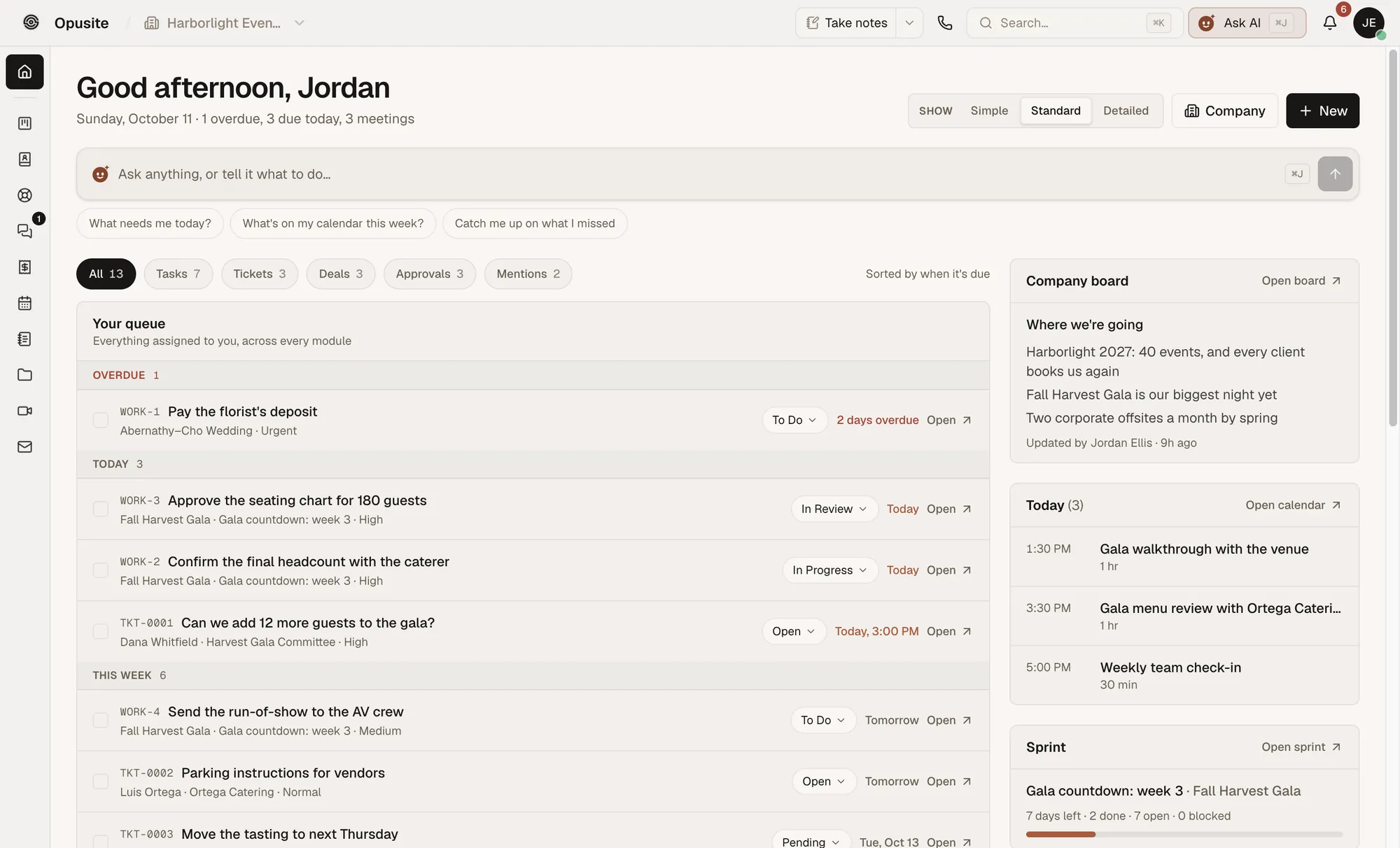
What replaces what. If you are moving from monday, this is the map:
| monday product | In Opusite | Opusite plan |
|---|---|---|
| Work management boards | Workbench: board, list and table views, sprints, and rules that assign, notify or label work | Business or Operations |
| CRM | CRM: contacts, companies, deals, a pipeline board and a Today screen of follow-ups due | Business |
| Service | Help Desk: tickets with SLA targets, a customer portal, and a ticket escalated into a project task | Business |
| WorkForms | Forms: answers can go to the CRM, an email list or the help desk | Business |
| Docs | Pages | Every seat |
| Updates and chat on items | Messaging: channels, direct messages and threads | Business or Operations |
| monday dev | Workbench sprints, with burndown and velocity | Business or Operations |
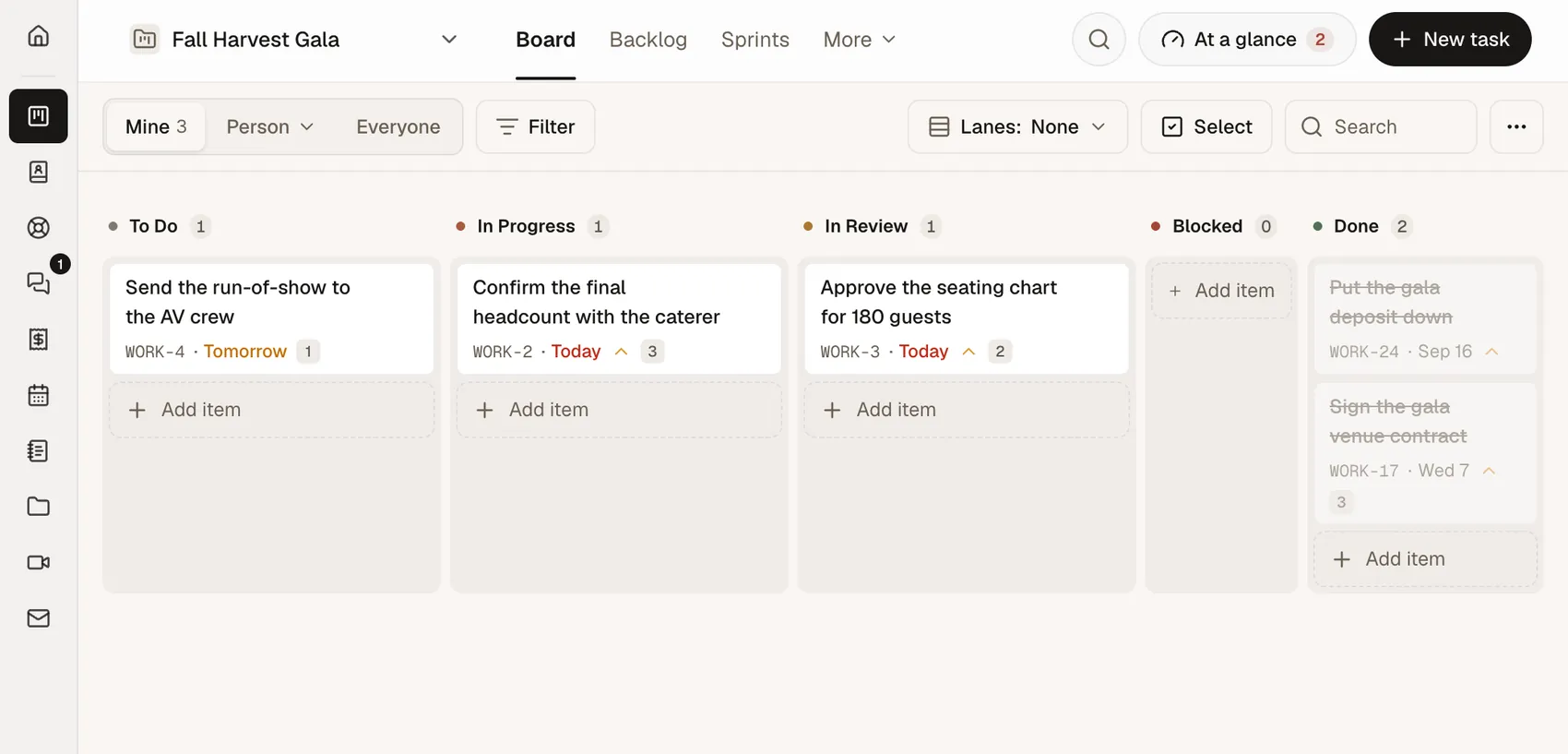
Price. $150 a seat a month for Business or Operations, $225 a seat for both, sold in steps of 3, 6 or 9 seats. Ten seats or more are priced with you. Every seat includes the Personal tools (Pages, Meetings, Email, Vault, Calendar, Sheets, Boards, Files, Analytics, Presentations and Ask Opusite), and every company gets $25 of AI use a month. Setup is a 30-minute call, after which your team is invited and your tools are switched on.
Where it falls short. It costs more per seat than every monday plan, and it has no free plan or free trial. It is not full bookkeeping, so you keep QuickBooks or Xero for your books. Phone and social posting are marked coming soon. It is invite-only today, so the way in is a demo call, not a sign-up button.
Pick it if you are a service team that pays for two or three monday products and would rather pay more per seat for one workspace set up with you. Skip it if you only use monday for boards, or if price per seat is your main reason for leaving. See what each Opusite plan includes and costs.
How to move off monday without losing anything

- Export the whole account. As the account admin, click your profile picture, choose Administration, then General, then Account, and choose Export account data. monday says this can take up to 24 hours, and emails you a link to a zip file that works for 24 hours.
- Save workdocs as PDFs first. monday's help center says archived boards and workdocs are not included in the account export, and neither are dashboards or the Emails & Activities timeline. Export anything you need from those by hand before you leave.
- Keep the columns that matter. For clients: name, email, phone, company and owner. For open work: the item, who owns it, its status, its due date and its board. For deals: the stage, the value and the next step.
- Rebuild automations last. Automations and integrations do not move between products. List the three you actually rely on and rebuild those first.
- Watch your seat set when you cancel. monday's yearly plan can be refunded only in part, and only within 30 days of paying. Past that, monday offers no refunds for downgrades, so time your switch for your renewal date.
- Run both for two weeks. Keep monday open, read only, while the team works in the new tool, then cancel.
Opusite's CRM imports contacts and companies from a CSV or Excel file, up to 25,000 rows at a time, matching columns such as name, email, phone and company. It does not import deals, so open deals, tasks and tickets are set up by hand. Setup is a 30-minute call with us, so you are not doing it alone. The CRM with project management guide shows how a deal and its work sit together afterwards.
How to choose, in five questions

- Which monday products do you pay for? If it is only work management, compare Asana, ClickUp, Trello and Smartsheet. If it is CRM or service, compare the sales and support tools. If it is two or three, look at Bitrix24, Zoho One and Opusite.
- How many people, exactly? On monday, 6 and 9 people both pay for 10 seats. Asana, ClickUp, Trello and Smartsheet charge per person. Bitrix24 charges per band of users, and Opusite sells 3, 6 or 9 seats.
- How many automations do you run? monday Standard includes 250 automation actions a month. If you run more, compare each plan's automation limits before you compare prices.
- Do you need it free? Trello, Asana Personal, ClickUp Free Forever and Bitrix24 Free cost nothing for small teams. OpenProject Community is free if you host it.
- Who will set it up? The board tools are self-serve. Bitrix24 and Zoho One take time to configure. Opusite is set up with you on a call.
How we checked these prices
Each price was read from the vendor's own pricing page on October 18, 2026, from the United States, and a figure tied to yearly or monthly billing is labelled that way. monday's seat sets come from its help center articles on plans and auto-upgrades, read the same day. monday's work management page shows yearly prices only; its help center says yearly billing includes an 18% discount over monthly. monday CRM's page shows two prices per plan under a "Yearly SAVE 33%" switch without saying which billing the higher one belongs to, so we quote both as shown. ClickUp's page shows two sets of prices, and we say so. HubSpot's page shows $20 and a new-customer "Starts at $7" without saying which billing each is; we use $20. Zoho One's page opened as a regional version with no price for its all-employee plan, so we left it out of the table. Promotional prices are marked as such. Vendors change prices without notice, so check the source before you buy, and tell us at sales@opusite.com if a figure here is out of date.
Sources
Read on October 18, 2026, from the United States.
- monday.com work management pricing: https://monday.com/pricing
- monday CRM pricing: https://monday.com/crm/pricing
- monday service pricing: https://monday.com/service/pricing
- monday.com Support, "Plans and pricing for monday.com": https://support.monday.com/hc/en-us/articles/4405633151634-Plans-and-pricing-for-monday-com
- monday.com Support, "How to manage an auto-upgrade": https://support.monday.com/hc/en-us/articles/360016123760-How-to-manage-an-auto-upgrade
- monday.com Support, "How to export your entire account's data": https://support.monday.com/hc/en-us/articles/360002543719-How-to-export-your-entire-account-s-data
- Asana pricing: https://asana.com/pricing
- ClickUp pricing: https://clickup.com/pricing
- Trello pricing: https://trello.com/pricing
- Smartsheet pricing: https://www.smartsheet.com/pricing
- HubSpot pricing: https://www.hubspot.com/pricing/crm
- Pipedrive pricing: https://www.pipedrive.com/en/pricing
- Zendesk pricing: https://www.zendesk.com/pricing/
- Freshdesk pricing: https://www.freshworks.com/freshdesk/pricing/
- Bitrix24 pricing: https://www.bitrix24.com/prices/
- OpenProject pricing: https://www.openproject.org/pricing/
- Slack pricing: https://slack.com/pricing
- BIGContacts, "Top 7 monday.com Sales CRM Alternatives in 2026": https://www.bigcontacts.com/blog/monday-com-alternative/
- OpenProject, "The best open source alternative to Monday.com": https://www.openproject.org/blog/the-best-open-source-alternative-to-monday-com/
- Opusite pricing: /pricing
Questions people ask
- Is there a free alternative to monday.com?
- Yes, several. Trello's free plan covers up to 10 collaborators per workspace. Asana's Personal plan is free for 2 users, and ClickUp has a Free Forever plan. Bitrix24 is free for 1 to 2 users, and HubSpot's free tools cover up to 2 users for sales. If you can host software yourself, OpenProject's Community edition is free with no minimum number of users. For comparison, monday's own free plan covers up to 2 seats and 3 boards.
- Who is monday.com's biggest competitor?
- It depends on which monday product you mean, because monday sells four. Against monday work management, the usual rivals are Asana, ClickUp, Smartsheet and Trello. Against monday CRM, they are HubSpot and Pipedrive. Against monday service, they are Zendesk and Freshdesk. We did not find market-share figures we could check, so we do not rank them by size.
- Which is better, Slack or monday?
- They do different jobs, so most teams that use one also use something like the other. Slack is team chat: channels, direct messages and huddles for audio and video, from $7.25 a user a month billed annually on Pro, with a free plan that keeps 90 days of messages. monday work management is boards for tracking work, from $9 a seat a month billed yearly. If you want chat and boards in one product, look at the all-in-one tools in this guide: Bitrix24, Zoho One or Opusite.
- Why is Asana better than monday?
- It is not better at everything, but it is a little cheaper per seat and it does not sell seats in sets. Asana Starter is $10.99 a user a month billed yearly against $12 for monday Standard. monday sells seats in sets of 3, 5, 10, 15 and so on, so a team of 6 pays for 10 monday seats. On Asana, 6 people pay for 6. Asana's free Personal plan covers 2 users, the same as monday's free plan.
- What are the top 3 project management tools?
- There is no neutral ranking we could check. For a team leaving monday, the three we would compare first are Asana, ClickUp and Trello: all three publish their prices, all three have a free plan, and all three are board-and-task tools like monday. Pick by price at your team size, which is in the table in this guide.
- What does monday.com do in simple terms?
- monday.com gives your team boards. Each board is a table of items, such as tasks, clients or tickets, with columns for status, owner and dates. monday sells four products built on those boards: work management for projects, CRM for sales, service for support tickets, and dev for software teams. Each is priced on its own.
- Why is monday.com falling?
- If you mean its share price, we did not check market data for this guide, so we cannot say. If you mean why teams leave the product, the reasons we found on monday's own pages are: seats are sold in sets (a team of 6 pays for 10), automations are capped by plan (250 actions a month on Standard), and its work, CRM and support products are each priced separately.
- How do I export all my data from monday.com?
- An account admin can export everything at once. Click your profile picture, choose Administration, then General, then Account, and choose Export account data. monday emails a link to a zip file within 24 hours, and the link works for 24 hours. Archived boards, workdocs, dashboards and the Emails & Activities timeline are not included, so export workdocs as PDFs first.