Zoho Desk Alternatives (2026): 10 Compared, With Prices
Ten Zoho Desk alternatives for small support teams, with US prices read from each vendor's own page on November 20, 2026, what 3, 5 and 10 agents pay, and how to get your tickets out of Zoho Desk.
By Opusite Team · Updated

If you are leaving Zoho Desk, the closest like-for-like moves are Freshdesk Growth and Zendesk Support Team, both $19 an agent a month billed yearly; the free options are Help Scout for up to 5 users and Jira Service Management for up to 3 agents; and if the real problem is that tickets live apart from your sales and project work, an all-in-one workspace such as Opusite costs more per seat but can replace those other apps. This guide lists every price we read on November 20, 2026, works out what 3, 5 and 10 agents pay, and shows how to get your data out of Zoho Desk first.
The short answer
- Closest swap for a Zoho Desk team: Freshdesk. Similar tiers, a 14-day trial, Growth from $19 an agent a month billed yearly.
- Email-first team that wants a free start: Help Scout. Free for up to 5 users with one shared inbox; Standard is $25 a user billed yearly.
- Bigger team that expects to grow: Zendesk. Support Team from $19, Suite Team from $55 an agent a month billed yearly.
- Already on HubSpot's CRM: HubSpot Service Hub. Free for 2 users; Starter is $20 a seat at list price, $7 for new customers on yearly billing.
- Support runs out of a shared Gmail inbox: Hiver, which also sells a version that works inside Gmail. From $25 a user billed yearly.
- Online store: Gorgias, priced by tickets a month rather than by agent.
- Engineers already in Jira: Jira Service Management, free for 3 agents.
- A team of 5 to 20 that also runs its CRM, projects and invoices in separate apps: Opusite, with the help desk in the same workspace, at $150 a seat a month.
What Zoho Desk costs, and where teams hit its limits
Zoho Desk is inexpensive to start. The price rises as you need more of it, because many features arrive only on the higher plans. Prices and plan contents below are from Zoho's US pricing page and its plan comparison page, read on November 20, 2026.
| Zoho Desk plan | Billed yearly | Billed monthly | Users | What it adds |
|---|---|---|---|---|
| Free | $0 | $0 | Up to 3 | One support email address, a help center, a private knowledge base for agents, one web form |
| Express | $7 a user | $9 a user | Up to 5 | Social media tickets (X, Facebook, Instagram), a workflow rule for tickets, direct assignment rules, multi-level escalations, customer happiness ratings, a custom domain |
| Standard | $14 a user | $20 a user | No limit | A public knowledge base, a community forum, live chat on your website (one Business Messaging channel), WhatsApp and other messaging apps, an answer bot, 50 custom reports, one full data backup a month, light agents at $6 |
| Professional | $23 a user | $35 a user | No limit | Telephony, Blueprints, Automation Studio, up to 10 departments, round-robin assignment, pre-built AI agents, a multilingual knowledge base, parent-child tickets, webhooks |
| Enterprise | $40 a user | $50 a user | No limit | Zia Actions, live chat through Zoho SalesIQ, guided conversations, skill-based assignment, multi-level IVR, a multi-brand help center, custom modules, sandboxes, an audit log, 50 free light agents |
| Ultimate | $55 a user | $65 a user | No limit | Higher limits than Enterprise, such as 100 free light agents, 1,000 support email addresses and 100 departments |
Four things in that table push the cost up as a team grows:
- Handing tickets out evenly costs $23 a user. Express has direct assignment by rules, but round-robin assignment, which spreads tickets by workload or in turn, starts on Professional.
- Public help articles and website chat start on Standard. Every plan has a help center, but a public knowledge base, and live chat on your website through Business Messaging, start on Standard at $14 a user.
- Monthly billing costs more. Zoho's toggle says yearly billing saves up to 34%; Professional is $35 a user paid monthly against $23 paid yearly.
- Users are capped on Free and Express. Zoho's plan comparison lists 3 users on Free, 5 on Express and no limit from Standard up, so a sixth agent means moving up to Standard at $14 a user.
Complexity is the other reason the top-ranked guides give. SnohAI's guide, ranked second for this search on November 20, writes that Capterra reviewers "describe configuring complex Blueprints as something that requires real trial and error". That is a reviewer's experience, not a measurement; try the alternatives below on your own tickets before you decide.
Prices, checked on November 20, 2026
Every figure was read from the vendor's own US pricing pages on the same evening, in US dollars, per agent (or per user or seat, in the vendor's own word) a month unless the row says otherwise. Taxes are extra. Where a page did not show a figure, the cell says so.
| Tool and plan | Billed yearly | Billed monthly | Free plan | Notes |
|---|---|---|---|---|
| Zoho Desk Express / Standard / Professional / Enterprise / Ultimate | $7 / $14 / $23 / $40 / $55 | $9 / $20 / $35 / $50 / $65 | 3 users | Express holds up to 5 users; light agents $6 from Standard (50 free on Enterprise, 100 on Ultimate) |
| Opusite Business (Help Desk included) | $125 a seat ($1,500 a year, paid up front) | $150 a seat | No | Sold in 3, 6 or 9 seats; a seat is anyone on your team who signs in |
| Freshdesk Growth / Pro / Enterprise | $19 / $55 / $89 | $23 / $66 / $107 | No (14-day trial) | 500 free AI Agent sessions once per account, then $49 per 100 |
| Zendesk Support Team / Suite Team / Suite Professional | $19 / $55 / $115 | $25 / $69 / $149 | No (14-day trial) | Suite Enterprise is priced by sales |
| Help Scout Standard / Plus / Pro | $25 / $45 / $75 | $30 / $54 / $90 | Up to 5 users | Pro needs at least 10 users; AI add-on $0.75 per resolution |
| HubSpot Service Hub Starter / Professional / Enterprise | $7 (list $20) / $90 / $150 | $10 / $100 / not shown | Up to 2 users | Starter discount is for new customers; Professional has a one-time $1,500 onboarding fee |
| Front Starter / Professional / Enterprise | $25 / $65 / $105 | $35 / $85 / annual only | No (14-day trial) | Starter is for up to 10 seats |
| Hiver Growth / Pro / Elite | $25 / $55 / $85 | $35 / $65 / $95 | No (7-day trial) | Same prices for Hiver Omni and Hiver in Gmail |
| HappyFox Basic / Team / Pro | $24 / $49 / $99 | $29 / $69 / $119 | No (14-day trial) | Basic is capped at 5 agents; free migration with yearly plans |
| Jira Service Management Standard / Premium (10 agents) | $2,700 / $6,200 a year for 6 to 10 agents | $26.90 / $61.60 an agent | 3 agents | Price per agent changes with team size; sold in Atlassian's Service Collection |
| Gorgias Basic / Pro / Advanced | $77 / $471 / $1,227 a month for the whole store | $90 / $550 / $1,430 | No (free trial) | Priced by tickets a month (300 / 2,000 / 5,000), not by agent; prices include its AI Agent |
Sources for every row are listed at the end of this guide.
What 3, 5 and 10 agents pay a month

The lowest paid plan of each tool, billed yearly, shown as a monthly cost. These are the entry plans, so check that the plan includes what you use today in Zoho Desk.
| Tool and plan | 3 agents | 5 agents | 10 agents |
|---|---|---|---|
| Zoho Desk Express | $21 | $35 | Not on Express (5-user limit) |
| Zoho Desk Standard | $42 | $70 | $140 |
| Freshdesk Growth | $57 | $95 | $190 |
| Zendesk Support Team | $57 | $95 | $190 |
| Help Scout Standard | $75 ($0 on Free) | $125 ($0 on Free) | $250 |
| HubSpot Service Hub Starter | $21 ($60 at list) | $35 ($100 at list) | $70 ($200 at list) |
| Front Starter | $75 | $125 | $250 |
| Hiver Growth | $75 | $125 | $250 |
| HappyFox Basic | $72 | $120 | $490 (Team plan: Basic stops at 5) |
| Jira Service Management Standard | $0 (Free plan) | Not read | $225 ($2,700 a year) |
| Gorgias Basic | $77 for up to 300 tickets a month, whatever the team size | Same | Same |
| Opusite Business | $375 (3 seats) | $750 (6 seats) | Priced with you |
Opusite's figure covers everyone who signs in, not only the agents, and each seat includes the CRM, projects, invoices, documents and chat as well as the help desk. For the help desk alone, at 3 and 5 agents it is the most expensive row in the table.
The ten alternatives
Opusite comes first because we make it, so you can weigh what we say about it knowing that. Then come the closest like-for-like help desks, then the tools built for one kind of team.
1. Opusite: the help desk inside the workspace your team already runs on
We make this one.
Opusite is not a help desk on its own. It is one workspace for small teams, typically 5 to 20 people, and Help Desk is one of the tools in its Business plan, beside the CRM, projects (Workbench), invoices, documents and team chat. A customer's tickets sit on the same customer record as their deals and invoices, and the help desk, CRM and projects share the same contacts and companies.
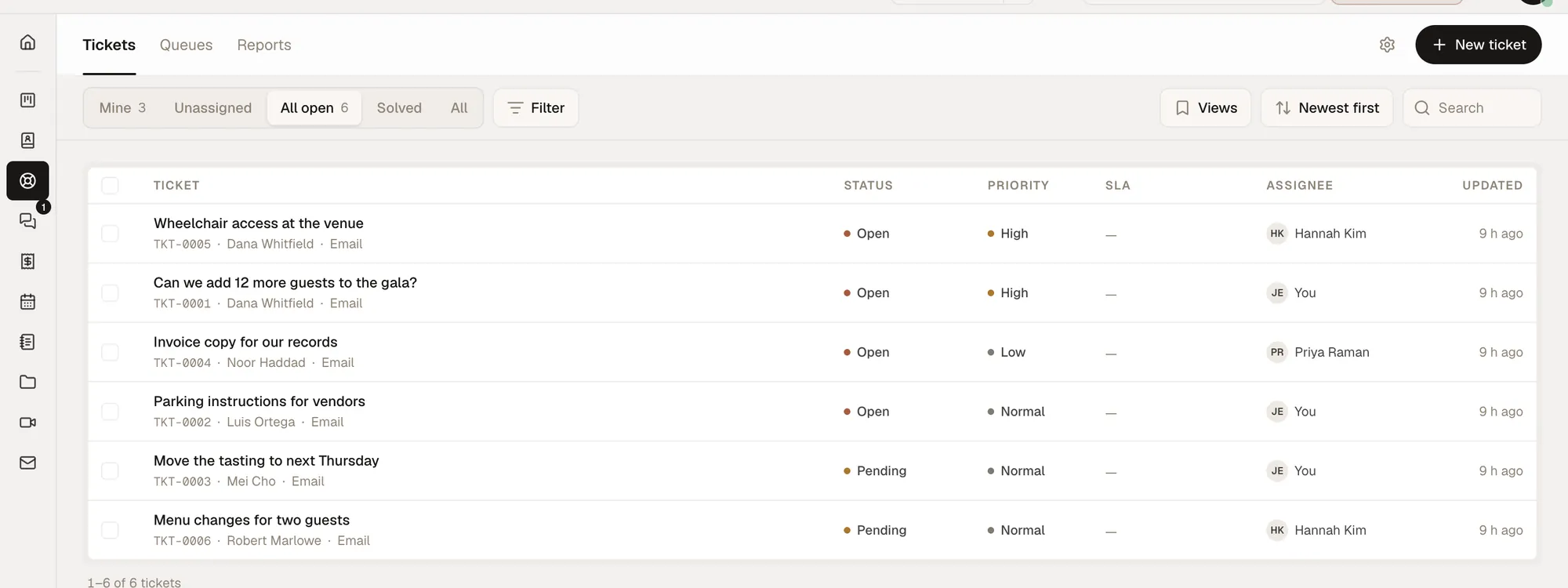
What the Help Desk does. Customer emails become tickets, with types, priorities, statuses, saved views and bulk changes. Agents reply by email and leave internal notes. Queues and routing rules hand tickets out. SLA targets run on business hours, with early warnings and a compliance dashboard. A satisfaction survey goes out after a ticket is solved, and customers can track their tickets in a portal. A ticket can be escalated into a project task, so the work it needs appears in the project where the team plans it. The Operations plan adds Service Desk, a public catalog of the services you offer that people request work from.
Price. $150 a seat a month for Business, or $1,500 a seat a year paid up front, which is 2 months free. Seats come in steps of 3, 6 or 9; 10 or more are priced with you. A seat is anyone on your team who signs in, and every seat also gets the Personal tools (Pages, Meetings, Email, Calendar, Files and the AI assistant). Business and Operations together are $225 a seat. Every company gets $25 of AI use a month. Setup is a 30-minute call, after which your team is invited and your tools are switched on.
Where it falls short. Its entry price is the highest in this guide: if all you want is a ticket inbox, every other tool here starts lower. Its features page lists no help-center articles for your customers and no chat widget for your website, and its phone tool is not open to customers yet. It does not import Zoho Desk tickets: your contacts and companies come across as spreadsheets into the CRM, and your old tickets stay in your Zoho Desk backup. It is invite-only today, so the way in is a demo call, not a sign-up button.
Pick it if you pay for Zoho Desk next to a separate CRM, project tool and invoicing app, and the switching between them is the real cost. Skip it if you need a help center, live chat or phone support now.
2. Freshdesk: the closest like-for-like swap
Freshdesk is a help desk with the same shape as Zoho Desk: tiered plans, SLA policies and an AI layer (Freddy). Its Growth plan is $19 an agent a month billed yearly or $23 monthly; Pro is $55 or $66; Enterprise is $89 or $107. There is a 14-day free trial.
Where it falls short. The pricing page shows no free plan. AI costs extra in two places: Freddy AI Copilot is an add-on at $29 an agent a month on Pro and Enterprise billed yearly, and the AI Agent gets 500 free sessions once per account, then $49 per 100 sessions.
Pick it if you want a tiered help desk much like Zoho Desk and can budget for AI separately.
3. Zendesk: Support and Suite plans
Support Team is $19 an agent a month billed yearly or $25 monthly; Suite Team is $55 or $69; Suite Professional is $115 or $149; Suite Enterprise is priced by its sales team.
Where it falls short. There is no free plan. Zendesk says its AI agents are included in every Suite and Support plan "with pricing based on the successful outcomes they deliver": each plan includes 5 automated resolutions per agent a month (10 on Suite Professional), and more cost $1.50 each committed in advance or $2.00 pay as you go. That makes the monthly bill depend on how much the AI answers.
Pick it if you want Zendesk's Suite plans and its AI agents, and the higher price per agent is acceptable.
4. Help Scout: email-first, with a real free plan
Help Scout is organised around shared email inboxes: every plan is sold with a set number of them. The Free plan covers up to 5 users with 1 shared inbox, 1 public knowledge base and 25 contacts a month. Standard is $25 a user a month billed yearly or $30 monthly (up to 25 users); Plus is $45 or $54 (up to 50); Pro is $75 or $90, for at least 10 users.
Where it falls short. The free plan stops at 25 contacts a month, so it suits only a very small inbox. Extra inboxes are $10 a month each billed yearly, and its AI assistant is an add-on at $0.75 per resolution.
Pick it if your support is mostly email and you are under 25 users.
5. HubSpot Service Hub: when your CRM is already HubSpot
HubSpot sells Service Hub as part of the same platform as its free CRM and its sales and marketing software. It is free for up to 2 users. Starter is listed at $20 a seat a month, shown at $7 a seat billed yearly or $10 billed monthly as a discount for new customers. Professional starts at $90 a seat billed yearly, or $100 billed monthly with a yearly commitment; Enterprise starts at $150 a seat.
Where it falls short. Professional carries a required one-time onboarding fee of $1,500, so the first year costs more than the seat price suggests. The Starter discount is for new customers only, so plan your budget on the $20 list price.
Pick it if your sales team already works in HubSpot and you want support on the same records. If you do not use HubSpot, compare it on price alone.
6. Front: a shared inbox with ticketing
Front is built around a shared inbox with ticketing; its Starter plan is described as "single-channel support". Starter is $25 a seat a month billed yearly or $35 monthly, for up to 10 seats; Professional is $65 or $85, for up to 50 seats; Enterprise is $105, sold on yearly billing only.
Where it falls short. There is no free plan. Starter covers one channel type, so a team that wants email and chat together is looking at Professional. AI Copilot is an add-on at $20 a seat a month on Starter and Professional.
Pick it if your team works from email and has 10 seats or fewer to start.
7. Hiver: help desk features inside Gmail
Hiver sells two products at the same prices: Hiver Omni, a standalone help desk, and Hiver in Gmail, which lets a team assign, track and resolve conversations from a shared inbox inside Gmail. SLAs, satisfaction surveys and a customer portal start on Pro. Growth is $25 a user a month billed yearly or $35 monthly; Pro is $55 or $65; Elite is $85 or $95. The free trial is 7 days, on the Elite plan.
Where it falls short. There is no free plan, and the 7-day trial is half the 14 days that Freshdesk, Zendesk, Front and HappyFox offer. The Gmail version is for teams on Gmail; a team on another email system would use Hiver Omni.
Pick it if your support already runs from a shared Gmail address and nobody wants to learn a new screen.
8. HappyFox: help desk with migration included
HappyFox Help Desk is a ticketing help desk sold per agent or with unlimited agents. Basic is $24 an agent a month billed yearly or $29 monthly; Team is $49 or $69; Pro is $99 or $119. Every yearly Help Desk subscription includes free migration, which matters when you are leaving Zoho Desk with years of tickets.
Where it falls short. Basic is capped at 5 agents, so a sixth agent means Team at $49. Its unlimited-agent plans start at $1,999 a month billed yearly.
Pick it if you want the vendor to handle the migration and you can commit to a year.
9. Jira Service Management: free for 3 agents
Atlassian's service desk is sold as part of its Service Collection, and the price per agent depends on how many agents you enter. The Free plan covers 3 agents. At 10 agents, Standard was $26.90 an agent a month billed monthly, or $2,700 a year billed yearly; Premium was $61.60 an agent a month, or $6,200 a year. At the page's default of 75 agents, Standard was $21.50 an agent a month.
Where it falls short. Its pricing page needs a team size before it shows a price, and the paid plans bundle more than the help desk. Trial it on your own tickets before you commit.
Pick it if your engineers already work in Jira and you want support requests in the same Atlassian account.
10. Gorgias: for online stores
Gorgias is a help desk for ecommerce brands and prices by the number of tickets, not by agent: "never priced per agent", in its own words. With its AI Agent included, which is how the page shows prices by default, Basic is $77 a month billed yearly or $90 monthly for 300 tickets a month; Pro is $471 or $550 for 2,000 tickets; Advanced is $1,227 or $1,430 for 5,000. A Starter plan at $40 a month covers 50 tickets, on monthly billing only.
Where it falls short. Outside ecommerce it is the wrong fit: its plans are written for brands and it lists store platforms such as Shopify. Each plan covers a set number of tickets a month (300 on Basic), so a busy season matters more than headcount.
Pick it if you run a store, your agents answer order questions all day, and you would rather pay by volume than by head.
Stay with Zoho Desk if
Switching costs time, so it is worth saying when not to:
- You use Zoho CRM or Zoho One every day. Zoho Desk is part of the same suite. Our Zoho One pricing breakdown shows when the bundle is cheaper than separate apps.
- You are on Express or Standard and they do what you need. Express holds up to 5 users. At $7 a user billed yearly, Express ties with HubSpot's new-customer Starter price for the lowest paid per-agent price in this guide; at $14, Standard is lower than every other paid entry plan here except that HubSpot offer.
- Your problem is one missing feature. If the only gap is round-robin assignment or Blueprints, moving to Zoho Desk Professional at $23 a user may cost less than a migration.
How to choose, in four questions
- What does your team actually use in Zoho Desk each week? If it is email tickets and a few rules, start with the entry plans. If it is Blueprints, multiple departments and telephony, compare Zoho Desk Professional with Freshdesk Pro, Zendesk Suite Team and Help Scout Plus.
- How many agents will you have in a year? Help Scout's free plan stops at 5 users, HappyFox Basic at 5 agents, Front Starter at 10 seats and Zoho Desk Express at 5 users. Price the plan you will need, not the one you start on.
- How will AI be billed? Zendesk and Help Scout charge per resolution, Freshdesk per session after the free 500, Front per conversation for its Autopilot, and Gorgias includes a set number of AI-handled interactions in each plan. Estimate a busy month before comparing.
- Do your tickets need your sales and project work beside them? If agents keep a CRM, a project tool and an invoicing app open to answer tickets, an all-in-one tool such as Opusite, or HubSpot Service Hub with HubSpot's CRM, cuts that switching. If not, a dedicated help desk is cheaper.
How to move off Zoho Desk without losing anything

Zoho Desk has two ways to get your data out: Data Backup, on Standard and higher plans, and Export, on every plan. Both are described in Zoho's own help pages, listed under Sources.
- Take a full Data Backup first, if your plan has it. Zoho's plan comparison lists one full backup a month on Standard and higher plans and none on Free or Express; on those two plans, export each module instead (step 3). In Setup, open Data Backup under Data Administration and choose Full Backup. It includes tickets with their threads, comments, time entries and attachment links, plus contacts, accounts, tasks, calls, events, products, knowledge base articles, agents, teams and departments. Forum topics are not included. Only the account's primary contact can run it, and once a full backup starts, another full backup cannot be taken for 30 days. The download is a ZIP of CSV files, and the link expires after 7 days, so download it the same day.
- Fetch the attachments. The backup holds a download link for each attachment rather than the file itself, and Zoho says the files are fetched with its API. If old attachments matter, have someone fetch them before you cancel.
- Export the modules you will import. Setup, Data Administration, Export, New Export gives you one module at a time as a CSV file, for one department at a time: up to 50,000 records at once by Zoho's help page, and 1,000 records per batch on Free and Express by its plan comparison. Export contacts and accounts this way for the new tool's importer. Dates come out in GMT, whatever your time zone.
- Write down your rules. Assignment rules, SLA policies, business hours and Blueprints are settings, not records, and none of them is in the backup's list of modules. List the ones your team relies on and set them up again in the new tool.
- Move the support address last. Point your support email at the new tool, send a test from an outside address, and keep Zoho Desk open for two weeks so replies to old tickets are not lost.
HappyFox includes migration with yearly plans. Opusite imports the contact and company spreadsheets into its CRM, but not Zoho Desk tickets, so your history stays in your backup or export files.
How we checked these prices
Each price was read from the vendor's own US pricing pages on the evening of November 20, 2026, US Eastern time (between 04:00 and 04:50 UTC on November 21), with a browser set to a US location, on both the yearly and the monthly toggle where the page has one. Where a page showed two prices side by side, we read the page's code to tell which was yearly and which was monthly. Zoho Desk's user limits and plan contents come from its plan comparison table, which is more detailed than the plan cards on its main pricing page. Where a page did not show a figure, the table says so rather than guessing. Promotional prices, such as HubSpot's new-customer Starter price, are marked. Vendors change prices without notice, so check the source before you buy, and tell us at sales@opusite.com if a figure here is out of date.
Sources
Read on November 20, 2026 (US Eastern time), from the United States.
- Zoho Desk pricing: https://www.zoho.com/desk/pricing.html and plan comparison: https://www.zoho.com/desk/pricing-comparison.html
- Zoho Desk help, "Exporting Data From Zoho Desk": https://help.zoho.com/portal/en/kb/desk/data-administration/import-export/articles/exporting-data-from-zoho-desk-modules
- Zoho Desk help, "Backup Data": https://help.zoho.com/portal/en/kb/desk/data-administration/backup-and-data-archive/articles/backing-up-your-help-desk-data
- Opusite pricing: /pricing and features: /features
- Freshdesk pricing: https://www.freshworks.com/freshdesk/pricing/
- Zendesk pricing: https://www.zendesk.com/pricing/
- Help Scout pricing: https://www.helpscout.com/pricing/
- HubSpot Service Hub pricing: https://www.hubspot.com/pricing/service
- Front pricing: https://front.com/pricing
- Hiver pricing: https://hiverhq.com/pricing/hiver-omni and https://hiverhq.com/pricing/hiver-in-gmail
- HappyFox Help Desk pricing: https://www.happyfox.com/helpdesk/pricing/
- Jira Service Management pricing (Atlassian Service Collection): https://www.atlassian.com/collections/service/pricing?bundle=jira-service-management
- Gorgias pricing: https://www.gorgias.com/pricing
- SnohAI, "Zoho Desk Alternatives for SLA Automation and Workflow Orchestration": https://snohai.com/zoho-desk-alternatives-sla-automation/
Questions people ask
- What is the best alternative to Zoho Desk?
- It depends on why you are leaving. Freshdesk is the closest like-for-like help desk, from $19 an agent a month billed yearly. Help Scout suits teams that answer mostly email and has a free plan for up to 5 users. Zendesk costs more per agent than Zoho Desk at each step. HubSpot Service Hub fits teams already on HubSpot's CRM. Opusite suits a team of 5 to 20 people that wants the help desk in the same workspace as its CRM, projects and invoices, at a higher price per seat.
- Is Zoho Desk free?
- There is a free edition for up to 3 users with limited features. The paid plans, read on Zoho's US pricing and plan comparison pages on November 20, 2026, are Express $7 (up to 5 users), Standard $14, Professional $23, Enterprise $40 and Ultimate $55 per user a month billed yearly, or $9, $20, $35, $50 and $65 billed monthly. Zoho offers a 15-day free trial of the paid plans, after which the account moves to the free plan.
- Is Zendesk better than Zoho Desk?
- Zendesk costs more per agent at each step: its Support Team plan is $19 an agent a month billed yearly against $7 for Zoho Desk Express and $14 for Standard, and Suite Team is $55 against $23 for Zoho Desk Professional. Zendesk includes AI agents in every plan and charges for each conversation they resolve beyond the plan's allowance, which starts at 5 automated resolutions per agent a month. Which is better depends on the features you need at the price you can pay; the plan tables in this guide put them side by side.
- Can I export my tickets from Zoho Desk?
- Yes. Zoho Desk exports one module at a time as a CSV file from Setup, Data Administration, Export; its help page gives up to 50,000 records at once, and its plan comparison limits Free and Express to 1,000 records per batch. For everything, including ticket threads and comments, Standard and higher plans include one full Data Backup a month, which the account's primary contact runs and which arrives as a ZIP of CSV files with links to the attachments. Free and Express have no Data Backup.
- Which Zoho Desk alternatives have a free plan?
- Help Scout (up to 5 users, one shared inbox and 25 contacts a month), HubSpot Service Hub (up to 2 users) and Jira Service Management (up to 3 agents) showed free plans on their pricing pages on November 20, 2026. Freshdesk, Zendesk, Front, Hiver, HappyFox and Gorgias showed free trials but no free plan. Opusite starts with a demo call instead.